Design Strategy Vibe Coding: Building with Purpose

Updated: Oct 21, 2025

"Strategy is the idea. Execution is the work. But without the idea, the work has no meaning."
Let's Start Here
In this moment, anyone with access to AI tools can generate a prototype in hours. The barriers have collapsed. The tools are democratic. But here's the truth:
Speed without strategy is just noise.
This isn't about gatekeeping. It's about impact.
What we're exploring here is how to combine the velocity of "vibe coding"—this new, intuitive way of building—with the discipline of strategic design. Not to slow you down, but to make sure when you move fast, you're moving in the right direction.
What Design Actually Is
Design isn't decoration. That's a fundamental misunderstanding we need to correct.
Design is the concept or proposal for an object, process, or system. A designer creates and executes plans. In digital products, design is the strategic discipline that shapes experience and interaction.
Think of it as architecture for behaviour.
The Design Pyramid
I want you to see design as three layers, each building on the one below:

Goals & Structure: Strategy, user needs, UX outcomes, core features. This is the why and the what.
Flows & Usability: Navigation, interactions, task completion. This is the how.
Visuals & Vibe: Colours, fonts, polish, delight. This is the expression.
Most people start at layer three. The builders who create lasting work start at layer one.
The Design Iceberg
What you see—the UI, the icons, the visual design, the animations—that's maybe 10% of the work.

Beneath the surface:
Tactical UX: Interaction design, information architecture, wireframes, usability tests, user journeys, content strategy, psychology.
Strategic UX: User needs, objectives, constraints, critical thinking, feature prioritisation, goal definition, problem understanding, research.
The tip looks cool. But the iceberg is what keeps things from sinking.
How We Got Here: An Evolution
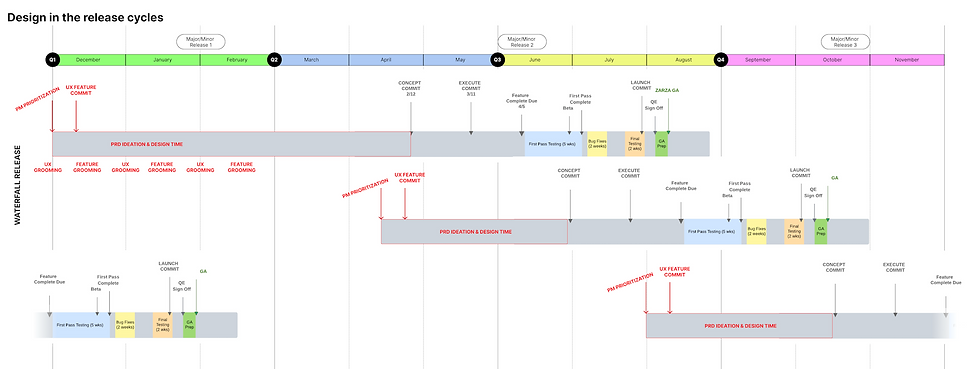
Waterfall Methodology
Timeline: 6-12 months
Clear goals. Detailed plans. Full alignment. Everyone knew the what, when, and how.
The cost: Rigid. Slow to change. Products often outdated by launch.
Agile Methodology
Timeline: 2-week sprints
Fast. Iterative. Feedback-driven. Collaboration and learning through doing.
The cost: Strategy sacrificed for speed. Big-picture vision lost in the sprint cycle.

Vibe Coding Methodology
Timeline: Hours to days
Concept to prototype instantly. Real-time iteration. Solo creativity unlocked.
The cost: Easy to skip strategy entirely. Risk of building fast in the wrong direction.

This is where we are now. The question isn't whether to use these tools—it's how to use them with intention.
The Vibe Coding Process (And What Gets Skipped)
The typical workflow has five stages:
Ideation (often skipped)
Prompting
Generation
Testing (often skipped)
Deployment
Notice what gets skipped? The thinking. The validation.
Those gaps—that's where strategy lives. That's where we're going to work.
Strategise, Then Stylise
Before you prompt, before you generate, pause.
Here's a framework—four questions that take maybe 15 minutes but can save you weeks of building in the wrong direction:
The 4-Question Design Check-In
1. Who is this for?
Get specific. "Everyone" is no one. Are you building for:
The more specific you get, the better you can serve them. Tool to try: Jobs to be Done (JTBD) Framework for understanding user motivations. | 2. What problem does it solve?Not what it does—what pain does it remove? Does it:
Focus on outcomes, not features. Features are "what." Outcomes are "so that." Resources: Brainstorm with Claude or ChatGPT, then refine with Nielsen Norman Group's outcome mapping. |
3. How will you know it works?
What does success look like?
Is it:
Define your success metric before you build. This becomes your north star. Tools to explore:
| 4. What's the smallest version you can prototype and test?Strip it to the core. What's the one essential feature that proves your concept? Build that first. Everything else can wait. Think of versions like dominoes—what needs to fall first? Approach: Start with MVP principles, then use Bolt.new for rapid prototyping, Analytics for insights, user interviews, and micro-surveys for real data. |
Create Your PRD (Product Requirements Document)
Take your four answers and distill them into a simple framework:
"This [product] helps [specific user] do [specific action] so that [meaningful outcome]."
Example:
"This app helps laid-off employees stay organized through the chaos so that they don't miss deadlines, lose benefits, or feel completely alone in the process."
That's your blueprint. That's what you prompt toward.
Tool recommendation:
Try Curionaut's vibe coding AI assistant to help build your PRD and break your idea into bite-size prompts for Bolt or Cursor.
Tiny Research, Big Impact
You don't need a research lab. You need three simple activities:
1. Ask Three Humans
Yes, DMs count. Text a friend. Post in a Discord.
Ask: "Would you use this? What's confusing?"
Real feedback beats assumptions every time.
2. Check Three Competitors
What exists already?
What do users love?
What do they complain about?
Learn from others' wins and mistakes. Don't reinvent the wheel—just build a better one.
3. Test Your Prototype with One Real Person
Watch them use it. Stay quiet.
Notice where they:
Hesitate
Click wrong
Get confused
Say "wait, what?
One person reveals patterns you'd never see alone.
Tools to consider:
UserTesting or Helio for quick feedback
Google Forms or vibe code a survey to gather feedback
Look into Gorilla Research Methodologies for structured approaches
Laying the Digital Foundation
Before you start coding interfaces, establish the structure:
Information Architecture (IA)
Organise content intuitively. Group related information for easy access and discoverability.
Resources:
Use Figma Whiteboarding to map it out
Try Miro for collaborative IA mapping
Define Key Workflows
Outline essential user journeys. Ensure smooth, logical interactions.
Remember:
C.R.U.D. = Create, Read, Update, Delete
Happy path vs sad path user flows
Edge cases matter
Tools to try:
Visualise Site Map
Develop a clear blueprint of pages and interconnections. Guide navigation and content placement.
Recommended tools:
Relume for AI-powered sitemaps
Figma for custom mapping
Octopus.do for visual sitemaps
Leverage AI for Design Context
Here's where it gets powerful: Use tools that bridge design and code.
Figma's Model Context Protocol (MCP) now allows AI coding agents in VS Code, Cursor, Windsurf, and Claude Code to access your design system—components, variables, styles, annotations.
This means your AI-generated code actually reflects your design intent, not just approximates it.
Key integration:
Figma MCP Server connects design context to development
Figma Make for prompt-to-prototype workflows
Visual Copilot by Builder.io for Figma-to-code conversion
In the AI Era, Thoughtful Design Is Your Superpower
Ethical
Build with respect for people's time, attention, data, and wellbeing.
Good design doesn't manipulate—it empowers and serves users authentically.
Consider:
Data privacy (avoid prompting with sensitive user data)
Consent mechanisms
Transparent AI usage
Inclusive
Design should work for everyone—different abilities, ages, backgrounds, contexts.
Accessibility isn't an add-on. It's core to great UX from day one.
Standards to follow:
WCAG 2.2 as your baseline
Use AEL Accessibility Checker or AAArdvark for automated scans
But remember: Professional accessibility audits are still essential
Intentional
Simplicity beats gimmicks. Every feature should have a reason.
If you can't explain why it's there, it probably shouldn't be.
Less is often more powerful.
Differentiated
Great UX is your competitive edge.
AI can replicate features quickly. But thoughtful, strategic design creates experiences people remember and recommend.
This is where you can't be copied.
From Fuzzy Idea to Focused Prototype
Strategy transforms vague concepts into clear, actionable products.
Watch this evolution:
Fuzzy Start:
"I want to build an app to help people who've been laid off."
Getting Clearer:
"An app that organises everything someone needs to handle after being laid off—like benefits, paperwork, and next steps."
Focused & Testable:
"Helps laid-off employees track critical dates, documents, and tasks related to unemployment, insurance, and legal deadlines, while providing curated state resources and key contact info—all in one calming, easy-to-use dashboard."
See the difference? That last version you can actually build and test.
The Hybrid Approach: Strategy + Speed
Here's the model that works:
Use AI for: | Use human strategy for: |
|
|
This isn't choosing one or the other. It's orchestrating both.
New Roles Emerging in This Space
As this practice evolves, new specialisations are emerging:
AI UX Strategist | Prompt QA Lead | Agent Orchestrator |
Integrates AI capabilities into overall UX strategy. Bridges business goals with AI-enabled experiences. | Ensures quality, consistency, and safety of prompts. Tests for bias and effectiveness. | Designs and manages complex AI agent workflows. Ensures different AI modules work together seamlessly. |
These roles recognise that in AI-enabled development, the most valuable work shifts from execution to orchestration. From making to directing. From coding to judgment.
Continue Your Design Education Journey
Design is a learnable skill that multiplies your impact as a builder.
Online Resources & Communities
Laws of UX - Best practices for building interfaces
Maven - Design courses from industry experts
Nielsen Norman Group - UX training and research
AI First Designer School - Community for designers navigating AI (8K+ members)
Interaction Design Foundation - Comprehensive UX courses
Stack Overflow 2025 Developer Survey - Current trends in AI-assisted development
Books & Frameworks
For Understanding Design:
How Design Makes the World by Scott Berkun - Best intro to good design
The Design of Everyday Things by Don Norman - Classic human-centered design
Don't Make Me Think by Steve Krug - Principles of intuitive navigation
For Ethical & Strategic Practice:
Conscious UX by Rikki Teeters - AI's ethical implications in design
UX Strategy by Jaime Levy - Deep dive into strategic frameworks
The User Experience Team of One by Leah Buley - Accomplishing more with less
For Fast-Paced Environments:
Lean UX by Eric Ries - Gathering feedback quickly
BAD (Business Aware Design) - Holistic product development
Research & Industry Reports
Vibe Coding for UX Design (arXiv) - Academic research on the practice
Tools Worth Exploring
For Design & Prototyping:
Figma - Design platform with AI features
Relume - AI-powered sitemaps and wireframes
Whimsical - Quick diagramming
For AI-Assisted Development:
Bolt.new - Vibe coding platform
Cursor - AI-powered code editor
GitHub Copilot - AI pair programming
Curionaut - Vibe coding AI assistant
For Research & Testing:
Helio - Quick user testing and metrics
UserTesting - User research at scale
Dovetail - Research repository
Hotjar - User behavior analytics
For Accessibility:
WAVE - Web accessibility evaluation
axe DevTools - Automated accessibility testing
W3C Evaluation Tools - Comprehensive list
Final Thoughts
The speed of AI-powered development tools is revolutionary. But speed without direction creates noise, not value.
By pausing to ask the right questions, conducting minimal but meaningful research, and establishing clear structure before you code, you transform vibe coding from a party trick into a powerful product development approach.
This isn't about adding bureaucracy. It's about adding intention.
Remember: Strategise, then stylise.
The 15 minutes you spend thinking before building can save weeks of rebuilding in the wrong direction.
In this new era, the builders who combine velocity with vision—who move fast and move deliberately—those are the ones creating work that matters.
The tools are democratic now. The discipline is what differentiates.
"The question isn't can you build it fast. The question is: should you? And if yes—for whom, and why?"
That's the work. That's always been the work.
This is just the beginning.
Sources & References:
Research & Industry Reports
DORA State of AI-assisted Software Development 2025
https://dora.dev/dora-report-2025/
https://services.google.com/fh/files/misc/2025_state_of_ai_assisted_software_development.pdf
Stack Overflow Developer Survey 2025
https://survey.stackoverflow.co/2025/
https://survey.stackoverflow.co/2025/ai
Vibe Coding for UX Design (arXiv)
https://arxiv.org/html/2509.10652v1
https://www.arxiv.org/pdf/2509.10652
McKinsey: How AI is Transforming Strategy Development
Hidden Benefits of Vibe Coding That Most Teams Miss
https://content.trickle.so/blog/hidden-benefits-of-vibe-coding-that-most-teams-miss
What is Vibe Coding? AI-powered Software Development Guide
https://zbrain.ai/what-is-vibe-coding/
Design in the Age of AI
https://medium.com/design-bootcamp/design-in-the-age-of-ai-2d136f5c5b08
UX Strategy & Research
Nielsen Norman Group - UX Strategy: Definition and Components
https://www.nngroup.com/articles/ux-strategy/
Nielsen Norman Group - Information Architecture Study Guide
https://www.nngroup.com/articles/ia-study-guide/
Nielsen Norman Group - UX Research Cheat Sheet
https://www.nngroup.com/articles/ux-research-cheat-sheet/
AI for UX Strategy: How Smart Teams Are Using It to Win
https://standardbeagle.com/ai-for-ux-strategy/
AI for UX Research: Complete Guide (2025)
https://www.parallelhq.com/blog/ai-ux-research
Roadmap for an AI-Powered UX Design Agent
https://medium.com/design-bootcamp/roadmap-for-an-ai-powered-ux-design-agent-676ce4e3d12d
Learn More Faster: How to Find Your Bullseye Customer and Their Perfect Product
https://www.learnmorefaster.com/
Design Strategy with Vibe Coding
https://gamma.app/docs/design-strategy-with-vibe-coding-ptuq9mjxli2q9gh?mode=doc
Tools & Platforms
Figma - Introducing the MCP Server
https://www.figma.com/blog/introducing-figma-mcp-server/
Figma AI
OpenAI - How Figma Integrates AI
https://openai.com/index/figma-david-kossnick/
Figma to Code with MCP & GitHub Copilot
https://medium.com/@vishal.kapadia/ai-powered-ux-to-code-with-figma-mcp-github-copilot-bd2fe4606e22
Accessibility & Ethics
Best Practices for Inclusive AI Testing
https://www.inclusionhub.com/articles/best-practices-for-inclusive-ai-testing
Accessible AI: Ensuring WCAG Compliance in Chatbots
https://a11ypros.com/blog/accessible-ai
W3C - Web Accessibility Evaluation Tools List
https://www.w3.org/WAI/test-evaluate/tools/list/
The Future of Accessibility Compliance in an AI-Driven World
AI Ethical Guidelines
https://library.educause.edu/resources/2025/6/ai-ethical-guidelines
AI Data Governance: Privacy, Consent & Storage Guide
https://quokkalabs.com/blog/ai-data-governance-privacy-consent-storage/
AI Coding Ethics
https://www.createq.com/en/software-engineering-hub/ai-coding-ethics
Ethical Considerations in AI Code Generation
Security & Development Practices
Vibe Coding Security Vulnerabilities: Risks, Examples, and Mitigation
https://blog.vidocsecurity.com/blog/vibe-coding-security-vulnerabilities
Vibe Coding: When Everyone's a Developer, Who Secures the Code?
https://www.securityweek.com/vibe-coding-when-everyones-a-developer-who-secures-the-code/
AI Coding Assistant ROI: Real Productivity Data 2025
https://www.index.dev/blog/ai-coding-assistants-roi-productivity
How Much Does AI Impact Development Speed?
https://arxiv.org/html/2410.12944v2
Vibe Coding in Practice: Motivations, Challenges, and a Framework
Education & Community
Laws of UX
Stanford d.school
Interaction Design Foundation
https://www.interaction-design.org
The 4 Ds: Double Diamond Design Thinking Model
https://www.fluxspace.io/resources/the-4-ds-double-diamond-design-thinking-model
Additional Context
What is Vibe Coding? Your 2025 Vibe Coding Guide
https://www.synergylabs.co/blog/what-is-vibe-coding-your-2025-vibe-coding-guide
Not All AI-Assisted Programming is Vibe Coding
https://simonwillison.net/2025/Mar/19/vibe-coding/
The Future of Vibe Coding
Comments